
Tips for Creating a Productive Home Workspace That Suits Every Lifestyle
tokyseu.pro >> Home Workspace>>Productivity>> Tips for Creating a Productive Home Workspace That Suits Every Lifestyle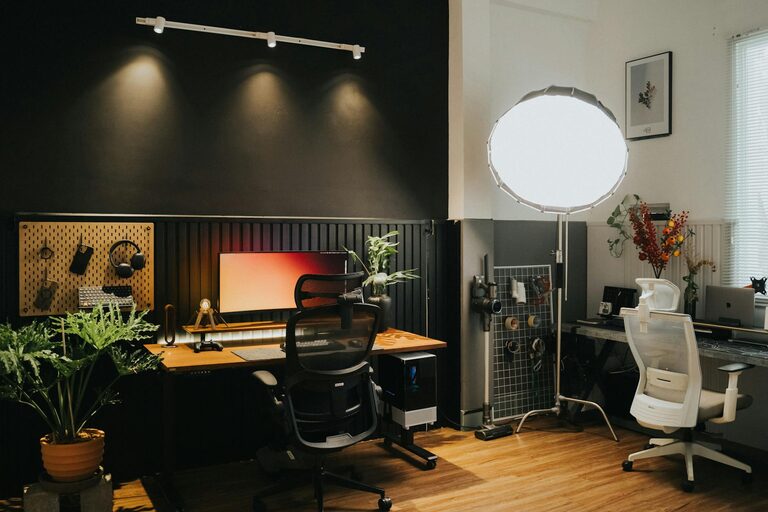
Tips for Creating a Productive Home Workspace That Suits Every Lifestyle
Creating a home workspace tailored to your unique lifestyle can transform the way you work, making your day more productive and enjoyable. Whether you’re a full-time remote worker, a student, or someone who occasionally works from home, having a well-thought-out environment is key. In this guide, we’ll explore practical tips to help you design a productive home workspace that suits different lifestyles and work habits.
Understand Your Personal Needs
Before setting up your workspace, consider your daily routines and work style. Think about questions such as:
– When do you feel most focused during the day?
– Do you prefer complete silence or some background noise?
– How much space do you need for your equipment and materials?
– Are you working with others in the household who need quiet or privacy?
Understanding these will guide you in selecting the right spot, furniture, and accessories that support your productivity.
Choose the Right Location in Your Home
Selecting an appropriate space is one of the first steps. Here are some options to consider based on different lifestyles:
For Concentration Seekers
If you need minimal distractions, choose a quiet and separate room. This could be a spare bedroom, a study nook, or a corner away from busy household areas. Using noise-cancelling headphones can help if complete solitude isn’t possible.
For Creatives or Collaborative Workers
If your work involves brainstorming or communication, an open and bright space might be best. Consider spots near natural light and with enough room for whiteboards, sketchpads, or dual monitors.
For Flexibility Lovers
If your work hours vary, or you share your workspace, consider a multipurpose area with modular furniture that’s easy to rearrange. A foldable desk or wall-mounted shelves can save space when not in use.
Prioritise Comfortable and Ergonomic Furniture
Comfort plays a big role in sustaining productivity. Invest in furniture that supports good posture and reduces strain.
– Desk Height: A desk that fits your height helps prevent back and neck pain. Adjustable desks are excellent for switching between sitting and standing.
– Chair: Choose an ergonomic chair with lumbar support. If that’s not possible, a supportive cushion can help.
– Monitor Position: Keep your screen at eye level to avoid looking down or up constantly.
– Accessories: Use a keyboard and mouse positioned comfortably to reduce wrist strain.
Optimise Lighting and Ventilation
Good lighting and fresh air can keep your mind alert and reduce fatigue.
– Natural Light: Position your desk near a window to benefit from daylight, which boosts mood and productivity.
– Artificial Light: If natural light is scarce, invest in adjustable LED lamps that mimic daylight.
– Ventilation: Ensure your workspace is well-ventilated. A fan or air purifier can help if the room feels stuffy.
Organise and Declutter Your Space
A tidy workspace reduces stress and distractions.
– Storage Solutions: Use shelves, drawers, or organisers to keep supplies within reach but out of sight.
– Cable Management: Tidy up cables with clips or cable boxes to prevent clutter.
– Daily Reset: Spend a few minutes at the end of each day tidying your workspace to start fresh the next morning.
Personalise Your Workspace
Adding elements that reflect your personality can make your workspace inviting and motivating.
– Photos, plants, or artwork offer visual interest.
– Aromatherapy or scented candles can create a pleasant atmosphere, just ensure they are safe to use.
– Inspirational quotes or a vision board can keep you motivated.
Use Technology Wisely
Technology can streamline your workflow but avoid distractions.
– Ensure your internet connection is stable to prevent interruptions.
– Use apps that help with task management and focus, such as timers or ‘do not disturb’ modes.
– Keep your devices updated and clean for optimal performance.
Adapt Your Workspace for Different Lifestyle Needs
Here are examples of how to fine-tune your workspace for various lifestyles:
For Parents Working at Home
– Set clear boundaries with family members using signs or scheduled ‘quiet times’.
– Keep a toy box or activity center nearby to entertain children while you work.
– Use noise-cancelling headphones to concentrate amid household noise.
For Night Owls
– Utilise adjustable lighting to avoid glare and eye strain during evening hours.
– Keep a soft source of light nearby instead of harsh overhead lights.
– Organise a quiet environment to ease transition from work to sleep later on.
For Early Birds
– Position your workspace to maximise morning sunlight.
– Start your day with a clear and energised space.
– Incorporate routine-setting elements like a wall clock or planner.
For Students or Part-Time Workers
– Create a portable workspace with a laptop desk or lap tray.
– Focus on flexible seating arrangements to adapt to different tasks.
– Use organisers for study materials or work documents.
Maintain Work-Life Balance
Working from home may blur the lines between work and personal time.
– End your workday by shutting down and tidying your workspace.
– Avoid working in bed or on the sofa to keep your home environment distinct.
– Schedule breaks to move away from your desk regularly.
Conclusion
A productive home workspace is one that fits your lifestyle and helps you stay focused and comfortable. By considering your personal preferences, choosing a suitable location, investing in ergonomic furniture, organising thoughtfully, and maintaining boundaries, you can create an environment that enhances your work experience. Remember, there’s no one-size-fits-all solution — the best workspace is one that supports how you work best.
Happy workspace creating!